
A website can look perfectly healthy in a browser while hiding broken links, redirect chains, duplicate titles, missing metadata, and pages that search engines struggle to reach. A crawler exposes those problems by visiting the site systematically and recording what it finds.
The quick answer
To crawl a website for free, use a desktop SEO crawler that follows the site’s internal links and reports technical and on-page data. Most free tiers stop after a limited number of URLs. Beam Us Up SEO Crawler is a useful exception: it is designed for Windows and does not impose a fixed page-count ceiling. Your computer’s resources and the website itself remain the practical limits.
What does it mean to crawl a website?
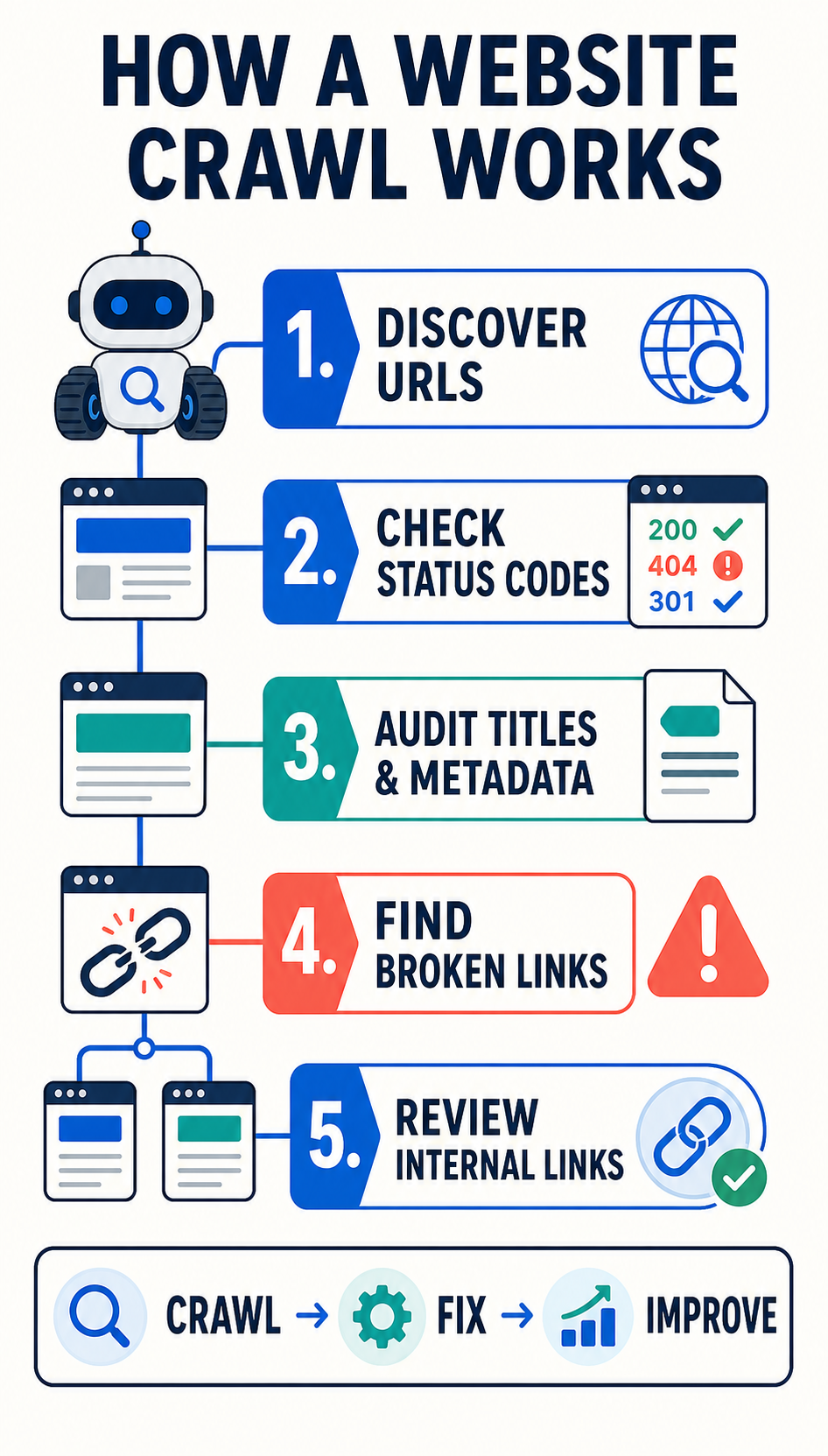
Crawling a website means using software to discover and request its URLs in a structured way. The crawler normally begins with a starting page—often the homepage—extracts the links it can find, visits those linked pages, and continues until it reaches the end of the accessible site or a rule tells it to stop.
Think of it as building a map. A visitor may browse five or ten pages, but a crawler can check every discoverable page and place the results into one report. For each URL, it can record the response status, page title, meta description, canonical tag, headings, indexability, content length, and internal links, depending on the tool.
Crawling and indexing are related but different. Crawling is the act of discovering and fetching pages. Indexing is a search engine’s decision to store and potentially show a page in search results. Running your own crawl does not add pages to Google; it helps you see the site more like a search engine crawler would.
What can a crawler collect?
- URLs and their HTTP status codes, such as 200, 301, and 404
- Page titles, meta descriptions, and headings
- Canonical and robots directives
- Internal and external links
- Image URLs and missing alternative text
- Redirects, loops, and chains
- Duplicate or unusually thin page elements
- Pages that are deep in the site structure or have no crawlable path
What are the benefits of crawling a website?
Find technical problems at scale
Manually checking a small site is slow and inconsistent. A crawl can surface hundreds of broken links, server errors, redirect chains, or blocked pages in one pass. It gives you a repeatable inventory instead of a collection of guesses.
Improve how search engines reach important pages
Internal links help users and search engines move through a site. Crawl data shows which pages receive many internal links, which pages are buried several clicks deep, and which valuable pages may be orphaned from the normal navigation.
Audit on-page SEO consistently
A crawler turns titles, descriptions, headings, and canonicals into sortable columns. That makes it easier to find missing, duplicate, overly long, or conflicting signals across an entire website.
Protect migrations and redesigns
Crawls taken before and after a migration create a valuable comparison. You can check whether old URLs redirect correctly, important pages still return 200 responses, internal links point to the final destinations, and metadata survived the move.
Create a measurable SEO backlog
A crawl converts vague concerns into specific tasks. Instead of “improve technical SEO,” the team can fix a defined list of 404 links, shorten redirect chains, rewrite duplicate titles, and strengthen links to priority pages.
Free website crawlers: why “without limits” is unusual
There are many excellent paid SEO crawlers. Paid products often provide polished visualizations, cloud crawling, scheduling, collaboration, JavaScript rendering, integrations, and support. Those features can easily justify the cost for agencies and large websites.
The free market is different. Many reputable tools offer a useful free tier but cap the number of URLs, restrict exports, limit projects, or provide only a temporary trial. Truly usable free crawlers without a fixed URL limit are rare.
Beam Us Up SEO Crawler: a practical free option
Beam Us Up SEO Crawler is a desktop crawler for Windows. Its main attraction is straightforward: it lets you crawl a site without the fixed page-count limit commonly attached to free versions of commercial tools. That makes it especially useful for site owners, consultants, students, and small teams that need a broad technical overview without buying a subscription first.
“Unlimited” does not mean infinite. A large crawl still depends on your computer’s memory and storage, the website’s speed, crawl settings, and any server or security controls. Crawl responsibly, use a sensible request rate, and only test sites you own or are authorized to audit.
How to crawl a website with Beam Us Up
- Download the crawler from the official Beam Us Up website and install it on a Windows computer.
- Choose the starting URL. In most cases, use the canonical HTTPS version of the homepage.
- Review the crawl settings. Respect robots.txt when appropriate and choose a crawl speed the server can handle comfortably.
- Start the crawl. The tool will follow internal links and collect information about each reachable URL.
- Filter the results. Begin with errors, broken internal links, redirect chains, missing titles, duplicate metadata, and indexability conflicts.
- Export and prioritize. Group findings by impact and effort rather than treating every warning as equally urgent.
Web story: Crawl, diagnose, improve
Swipe or scroll sideways through the six short story panels.
Website Crawl · 1/6
Crawl your website for free
Build a complete map of discoverable pages—and turn hidden SEO issues into a practical checklist.
Website Crawl · 2/6
What crawling means
Software starts at one URL, follows internal links, requests each page, and records what the server and page elements reveal.
Website Crawl · 3/6
See what manual checks miss
Find 404s, redirects, duplicate titles, missing descriptions, weak internal links, and pages buried too deep.
Website Crawl · 4/6
Fix by impact
Prioritize blocked or broken important pages first. Then improve redirect paths, metadata, and internal linking.
Website Crawl · 5/6
Free often means capped
Many free plans stop after a set number of URLs. That is enough for a sample—not always enough for the whole site.
Website Crawl · 6/6
Try Beam Us Up
Use a free Windows desktop crawler without a fixed URL ceiling. Your hardware and the website set the practical limits.
How to read a crawl report without getting overwhelmed
A crawler may report thousands of observations, but not every flag is a real problem. Start with issues that prevent access or send users to dead ends. Then move to signals that affect duplication, relevance, and site structure.
- Access and response: server errors, broken internal links, accidental blocks, and important non-200 URLs.
- Indexing signals: canonicals, noindex directives, and conflicting instructions.
- Internal linking: orphaned pages, excessive depth, and links that unnecessarily pass through redirects.
- Page templates: duplicate or missing titles, descriptions, and headings across groups of similar pages.
- Enhancements: image alt text, content depth, and opportunities to make navigation clearer.
Crawl responsibly
Only crawl websites you own or have permission to test. Use a moderate crawl speed, especially on shared hosting or older systems. Be careful around faceted navigation, calendars, internal search pages, and URL parameters that can create effectively endless combinations. If the site is business-critical, begin with a smaller section or test during a quiet period.
Frequently asked questions
Can I crawl any website for free?
Use a crawler only on a site you own or are authorized to audit. A tool may technically reach a public site, but the site’s terms, robots directives, server capacity, and applicable rules still matter.
Does crawling a website improve rankings?
The crawl itself does not improve rankings. The value comes from diagnosing issues and making useful fixes—such as repairing broken internal links, clarifying indexation signals, and improving how important pages are connected.
How often should I crawl my website?
Crawl after major releases, migrations, template changes, or large content updates. For an actively changing site, a regular monthly or weekly crawl can reveal regressions early. A small, stable website may need less frequent checks.
Start with a crawl, finish with priorities
Website crawling is one of the fastest ways to replace assumptions with evidence. If you need to crawl a website for free without a fixed URL allowance, Beam Us Up is a practical place to begin. Run the crawl thoughtfully, validate the findings, and turn the highest-impact issues into a focused action plan. If you would like help interpreting the data, explore BC Marketing’s SEO services.